
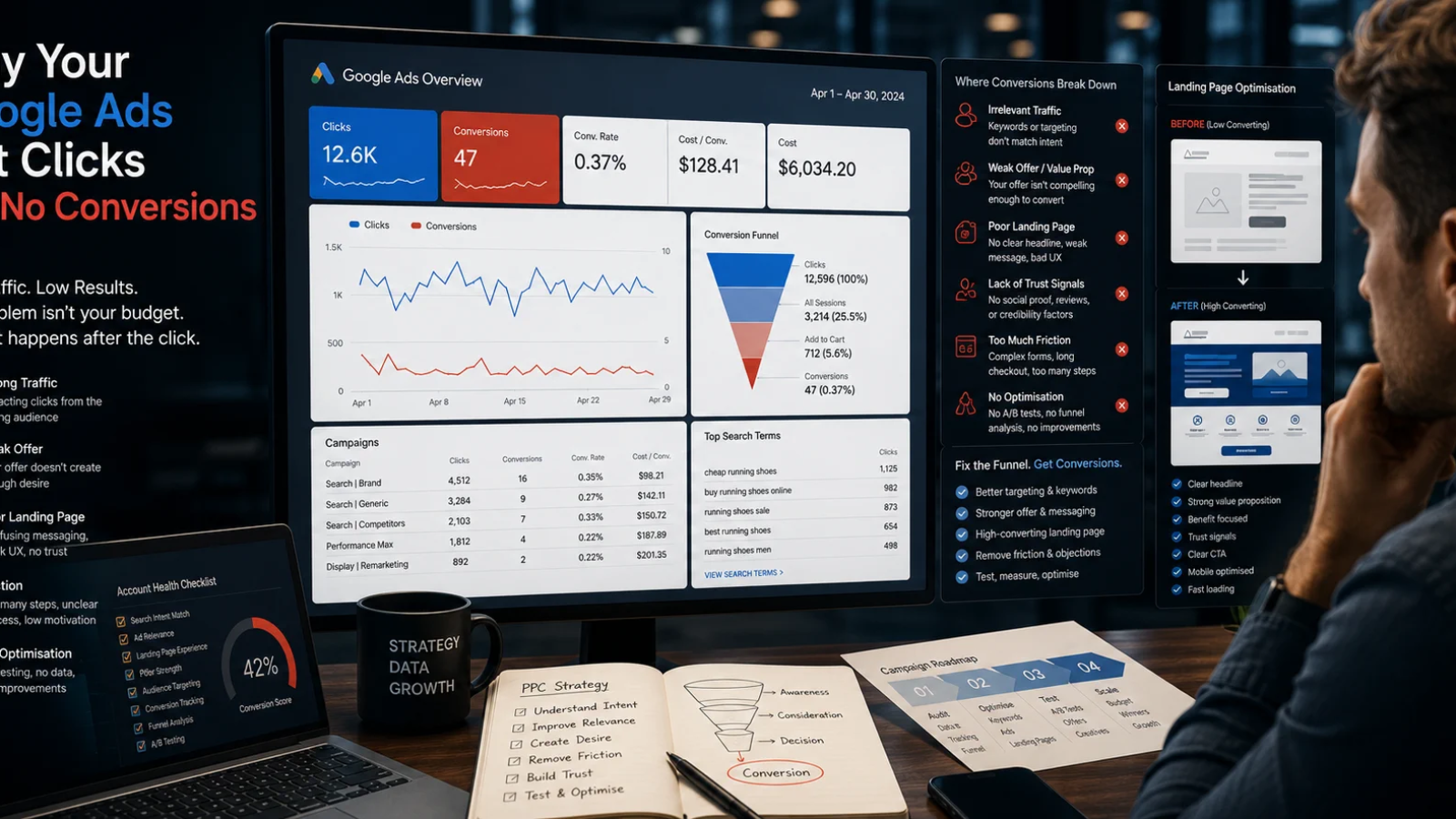
If you are dealing with Google Ads clicks but no conversions, the real problem is not usually that Google Ads “does not work.” It is more likely that one or more parts of the commercial journey are broken: the search intent, the campaign structure, the offer, the landing page, the tracking setup, or the follow-up process.
This is one of the most expensive PPC problems because the account can look active on the surface. People are clicking. Budget is being spent. Google Ads reports are filling with data. But if those clicks do not become enquiries, purchases, bookings or qualified leads, the campaign is not creating commercial value.
From a senior growth perspective, this issue is rarely caused by one isolated setting. It usually comes from a combination of targeting, offer strength, tracking quality, landing page experience and budget allocation. That is why MetaLabs approaches this problem through both Google Ads management and conversion rate optimisation, not just surface-level campaign tweaks.
Who this article is for
This guide is for business owners, e-commerce founders, service companies and marketing managers who are already spending money on Google Ads or preparing to invest in PPC but are concerned about wasted spend.
- You are getting traffic from Google Ads but very few leads or sales
- Your campaigns generate clicks, but the quality of enquiries is poor
- Your cost per conversion is too high to make the campaign profitable
- Your Google Ads account reports conversions, but the business does not see enough real revenue
- You are unsure whether the issue is the campaign, the website, the offer or the tracking
The goal is not to blame one channel too quickly. The goal is to diagnose the whole acquisition path so you can decide what to fix first.
Why Google Ads clicks but no conversions happen
Clicks without conversions usually happen when there is a mismatch between expectation and reality. The user searches for something, sees your ad, clicks because the ad seems relevant, then arrives on a page that does not fully answer the intent or does not make the next step clear enough.
Google Ads can bring demand to the website, but it cannot fix a weak proposition, a confusing landing page, slow decision-making, poor pricing clarity, weak trust signals or incorrect conversion tracking. This is why a campaign can have acceptable click-through rates while still failing commercially.
The main causes usually fall into six categories:
- Wrong intent: the keywords or search terms attract research traffic instead of buying traffic
- Weak landing page: the page does not make the value proposition, offer, proof or next step clear
- Poor campaign structure: budget is spread across too many themes, products, locations or audiences
- Tracking problems: conversions are missing, duplicated or measuring the wrong actions
- Offer mismatch: the ad promises one thing, but the page presents something less compelling
- Friction after the click: forms, checkout, booking flows or contact options are too difficult
Google describes conversion tracking as a way to measure meaningful actions after someone interacts with an ad, such as purchases or leads. That means the first diagnostic question is simple: are you measuring the right actions accurately?
The business impact of clicks without conversions
The obvious problem is wasted ad spend, but the commercial damage goes deeper than that.
When a campaign gets clicks but no conversions, Google Ads may continue optimising around low-quality signals. If the account has weak or incorrect conversion data, the bidding system can learn from the wrong actions. For example, it may optimise toward page views, low-intent form submissions or accidental events instead of qualified leads or revenue.
For e-commerce businesses, the impact can show up as high product page visits but low add-to-cart volume. For service businesses, it can show up as form visits but no submitted enquiries. For local companies, it can show as traffic from broad locations that are not commercially useful.
This creates a strategic problem: the business may decide that PPC does not work, when the real issue is that the account, landing page and tracking system were never aligned around the right commercial outcome.
Before increasing budget, launching more campaigns or changing agencies, it is usually smarter to run a structured Google Ads audit and review the full conversion path.
A practical diagnostic framework for Google Ads clicks but no conversions
When MetaLabs reviews this type of PPC problem, we do not start by randomly changing bids or pausing keywords. We start with the commercial journey.
1. Check whether the clicks are commercially relevant
Not all clicks are equal. A click from a high-intent search term is very different from a click from a broad research query. If your campaign is spending heavily on generic searches, competitor curiosity, informational phrases or loosely matched keywords, you may be paying for users who were never likely to convert.
Look at search terms, not only keywords. The search terms report often reveals whether Google is matching your ads to the wrong type of demand.
2. Check whether the ad and landing page match
The ad creates the promise. The landing page must fulfil it quickly. If the ad promotes a specific service, product category, problem or offer, the landing page should continue the same message without forcing the user to interpret what to do next.
A common mistake is sending all paid traffic to a generic homepage. That can work for strong brands, but for small business PPC it often creates unnecessary friction because the user has to search again after landing.
3. Check whether tracking reflects real business value
In GA4, Analytics is built around event-based measurement, which means businesses need to define and configure the events that matter commercially. This matters because a campaign can appear to be working if it tracks soft actions, while the business still receives no real enquiries or sales.
A proper marketing analytics review should separate micro-conversions from primary conversions.
4. Check whether the website can convert paid traffic
If the landing page is slow, unclear, generic or visually untrustworthy, even good traffic may fail. Paid traffic is less forgiving than organic traffic because users often compare multiple options quickly. Your page needs to answer the buyer’s main concerns before they hesitate.
For e-commerce, this includes product availability, shipping, returns, payment methods, product data quality, reviews, visual clarity and checkout confidence.
5. Check whether the offer is strong enough
Sometimes the campaign is technically fine, but the offer is not competitive. The user may understand the service, trust the company and still choose someone else because the offer is unclear, too expensive, too vague or too difficult to compare.
This does not always mean discounting. It can mean stronger positioning, clearer packages, better proof, a lower-friction consultation, improved product presentation or a better first-step CTA.
6. Check whether the follow-up process is fast enough
For lead generation, the conversion does not end when the form is submitted. If the sales team responds slowly, does not qualify leads properly or has no structured follow-up process, the PPC campaign may be blamed for a sales process problem.
A serious PPC review should therefore connect campaign data with CRM outcomes where possible.
Checklist table: where the conversion leak may be
| Area to check | Warning sign | Likely business problem | What to review first |
|---|---|---|---|
| Search intent | Many clicks but weak enquiries | Traffic is too broad or too informational | Search terms, match types, negative keywords and campaign segmentation |
| Ad message | Good CTR but poor landing page engagement | The ad attracts clicks but sets the wrong expectation | Ad copy, headlines, offer wording and landing page message match |
| Landing page | Users leave without taking action | The page does not build trust or make the next step obvious | Headline, CTA, proof, layout, mobile experience and page speed |
| Tracking | Google Ads reports conversions, but sales do not improve | The account may be optimising toward weak or incorrect events | Conversion actions, GA4 key events, duplicate tags and attribution settings |
| Offer | Qualified users compare but do not convert | The value proposition is not strong enough | Pricing clarity, guarantee, proof, package structure and buying objections |
| Budget allocation | Spend is spread thinly across many campaigns | The account does not generate enough meaningful data per segment | Campaign priorities, bidding strategy, budget concentration and test design |
| Post-lead process | Leads arrive but do not become customers | The sales process is leaking value after the PPC conversion | Lead quality, response time, CRM pipeline and sales qualification |
Common mistakes that make the problem worse
Increasing budget before fixing the leak
If the conversion path is broken, more budget usually means more waste. Budget should be scaled after the account has a clear conversion signal, a relevant traffic source and a landing page that can convert.
Judging performance only by clicks or CTR
Clicks and CTR are useful diagnostic metrics, but they are not business outcomes. A campaign can have a strong CTR and still fail if the traffic is not qualified or the landing page does not convert.
Using broad match without enough control
Broad match can be useful in mature accounts with good conversion data and strong negative keyword management. In weaker accounts, it can spend quickly on irrelevant or low-intent searches.
Sending all traffic to the homepage
A homepage is rarely the best landing page for every search intent. If someone searches for a specific service, category or solution, they should land on a page that directly addresses that need.
Tracking too many soft conversions
If every small interaction is treated as a conversion, the account can lose commercial focus. Newsletter clicks, page views, scroll depth and form starts may be useful secondary signals, but they should not be confused with qualified leads or revenue.
Ignoring conversion rate optimisation
Many PPC problems are actually CRO problems. If your traffic is relevant but the page does not persuade users to act, campaign changes alone will not solve the issue. This is where CRO support becomes essential.
What MetaLabs would check first
MetaLabs would approach the issue as a growth diagnosis, not just a PPC settings review.
The first priority would be to identify whether the problem sits before the click, after the click or inside the measurement layer. That distinction matters because each problem requires a different fix.
- Before the click: keyword intent, match types, search terms, audience signals, location targeting and ad copy
- After the click: landing page relevance, trust signals, CTA clarity, mobile experience, offer quality and checkout or form friction
- Measurement layer: conversion actions, GA4 events, Google Ads imports, duplicate tracking, consent impact and attribution interpretation
- Commercial layer: lead quality, sales feedback, revenue by campaign, product profitability and ROAS optimisation
For an e-commerce brand, MetaLabs would also review feed quality, product segmentation, product page clarity and checkout friction. If the store runs on Shopify, this may connect directly with Shopify development and CRO work. For a WordPress or WooCommerce business, the review may include landing page structure, lead forms, performance and technical implementation through web development.
For service businesses, the priority is different. The key question is whether the account is generating qualified enquiries, not just form submissions. This often requires better lead qualification, call tracking, CRM alignment and clearer service positioning.
If paid media is part of a wider acquisition mix, MetaLabs may also compare Google Ads against Meta Ads management, organic search, email, direct traffic and referral traffic. The purpose is not to force every channel to behave the same way. The purpose is to understand which channel is responsible for which stage of demand creation and conversion.
When to hire a Google Ads expert
You should consider hiring a Google Ads expert when the account is spending enough money that mistakes are more expensive than expert help. This is especially true if you have already tested campaign changes but still cannot clearly explain where the conversion problem is.
Expert support is usually justified when:
- You cannot tell whether the issue is traffic quality, landing page quality or tracking
- Your account has many campaigns but no clear structure or testing logic
- You are unsure which conversion actions Google Ads is optimising toward
- You have traffic but poor lead quality or weak sales outcomes
- Your internal team does not have time to analyse search terms, CRO, tracking and commercial performance together
- You need senior-level PPC consultant input rather than basic campaign maintenance
A strong PPC consultant should not only adjust bids. They should explain what is happening commercially, what should be tested first, what should be paused and what needs to change on the website or tracking side.
How to decide what to fix first
The best next step depends on where the evidence points. If search terms are irrelevant, fix campaign targeting first. If search terms are strong but users do not engage with the page, fix the landing page. If Google Ads reports conversions but the business receives no value, fix tracking and lead quality analysis first.
A simple decision model is:
- If traffic quality is poor, repair the campaign structure before touching the landing page
- If traffic quality is good but engagement is weak, prioritise landing page and offer improvements
- If conversions are reported but not visible in the business, audit tracking and CRM outcomes
- If conversion rate improves but revenue does not, review lead quality, pricing and sales process
- If performance is stable and profitable, then scale budget gradually with clear guardrails
This is also where fractional CMO support can help. Many PPC problems are not only media buying problems. They are positioning, offer, analytics and funnel problems that need senior commercial judgement.
Frequently asked questions
Why do Google Ads clicks but no conversions happen?
Google Ads clicks but no conversions usually happen because the campaign attracts users who are not ready or qualified to act, or because the landing page does not convert the traffic. Common causes include broad keywords, weak message match, poor landing page clarity, tracking issues, a weak offer or too much friction in the form, checkout or booking process.
What should a business check first when Google Ads gets clicks but no conversions?
Start with search terms, conversion tracking and the landing page. Search terms show whether the traffic is relevant. Tracking shows whether Google Ads is measuring real business actions. The landing page shows whether users receive a clear reason to enquire, buy or book. These three areas usually reveal whether the issue is traffic quality, measurement or conversion rate optimisation.
What are the most common mistakes businesses make with this problem?
The most common mistakes are increasing budget too early, judging performance by clicks instead of conversions, using broad match without enough control, sending traffic to a generic homepage and tracking weak actions as primary conversions. These mistakes can make the campaign appear active while the business still receives little commercial value.
How can a business diagnose whether Google Ads is the real problem?
Compare campaign data with website behaviour and business outcomes. If search terms are irrelevant, Google Ads structure is likely the problem. If search terms are relevant but users leave quickly, the landing page or offer may be the issue. If conversions appear in Google Ads but not in sales or CRM data, the tracking setup needs to be audited.
When should a business hire an expert instead of managing this internally?
A business should hire an expert when it cannot clearly identify where budget is being wasted, when tracking is unclear, when lead quality is poor or when internal changes have not improved performance. Expert support is especially valuable when Google Ads, CRO, analytics and commercial strategy need to be reviewed together.
How can MetaLabs help with Google Ads clicks but no conversions?
MetaLabs can review the campaign structure, search intent, conversion tracking, landing page experience and commercial funnel to identify the main conversion leaks. The goal is not only to adjust Google Ads settings, but to connect PPC performance with real leads, sales, revenue quality and growth decisions.
Get a senior review of your Google Ads conversion problem
If your campaigns are getting clicks but not enough leads or sales, the next step is not guessing. The next step is a structured review of traffic quality, tracking, landing pages and commercial performance.
MetaLabs can help identify where your PPC budget is leaking and what should be fixed first. Request a free campaign review or learn more about Google Ads management for small businesses, e-commerce brands and service companies.
You can also review selected MetaLabs results to understand how senior growth, PPC, CRO and analytics work together in practice.
Not sure why your marketing is not converting?
⬆️ Get a senior growth review ⬆️
MetaLabs can review your campaigns, tracking, landing pages and conversion journey to identify where budget is being wasted and what should be fixed first.